

Candy AI is much more than a basic text chatbot now. The current service mixes AI companions with custom characters, image creation, voice, video, and live phone calls.
For this review, I checked the current public platform, signup flow, character pages, image tools, subscription screen, Terms of Service, Privacy Notice, and safety policies. I also compared these claims with recent public user feedback.
Candy AI Review Score Card: Is It Worth Using?
Overall score: 8/10
Candy AI is strongest when you care about the visual side of an AI companion. Character creation is detailed, image tools are easy to find, and video is built directly into the experience. The biggest issue is cost. A Premium subscription does not remove the token system, so heavy use of images, video, calls, and other media can cost more than the headline subscription price suggests.
- Good character setup, but reports of repetition are worth noting
- Long-term memory is advertised, but controls are not very transparent
- Many visual and personality choices
- One of the platform’s strongest areas
- Voice and calls exist, but live calls are still in beta
- Cheap annual entry price, but media uses tokens
- Clear web interface and fast free signup
- Detailed policies, but important data-use details deserve attention
Candy AI makes most sense for someone who wants a visual AI girlfriend or boyfriend and plans to use images and short videos. People who mainly want long text chats may find the extra media tools less important.
Top Candy AI alternatives

She doesn't need a manual. Start talking and she'll figure out exactly what you like — your mood, your energy, your type. She adapts to you, not the other way around.


What Is Candy AI and How Does It Work?
Candy AI is an adult AI companion platform run by EverAI Limited, a Malta-registered company. Its Terms describe the service as an AI chat application with fictional companions plus generated images, videos, and voice content.
The platform has ready-made characters and a custom character builder. Candy says there are more than 100 characters available, with girlfriend, boyfriend, realistic, and anime-style options.
You can use Candy AI through a browser on desktop, mobile, or tablet. The site also supports an “Add to Home Screen” setup, so it can work much like a web app without a normal app-store installation.
How to Get Started With Candy AI
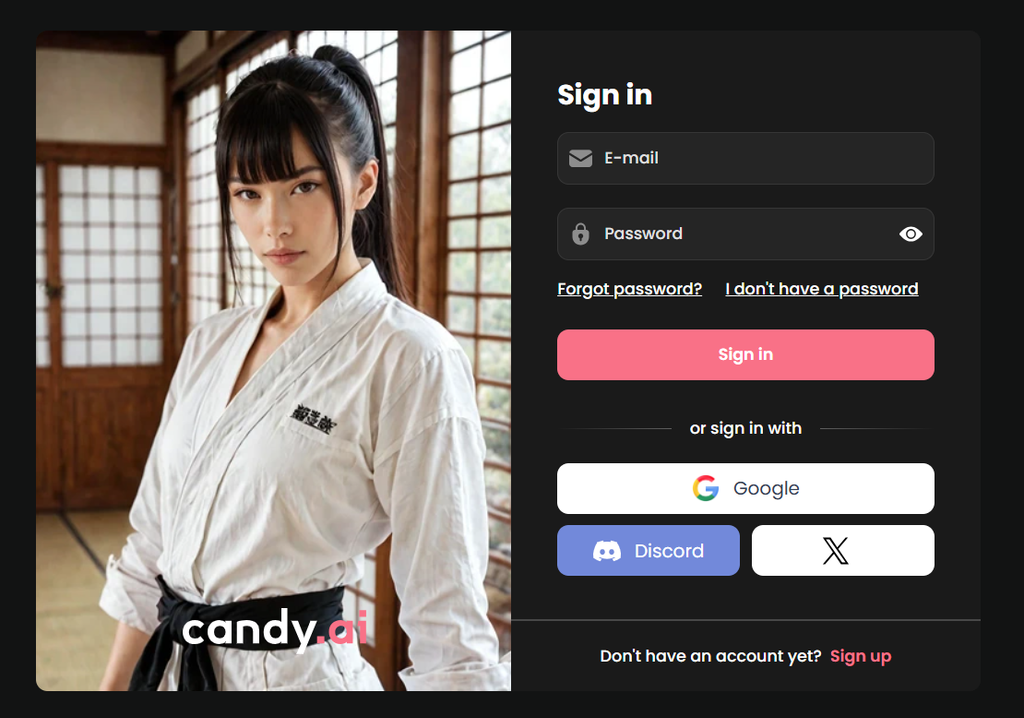
Getting into Candy AI is quick, and you do not need to enter payment details just to create an account. The signup screen keeps the process simple.
Here is the basic registration flow:
No payment card is requested on the initial signup screen. Candy AI also uses an 18+ age gate, and additional age or identity checks may apply where local regulations require them.
Free access is limited. The Terms state that free users can generally send up to five messages before paid access becomes necessary. This is enough to see how the interface works, but not enough to properly test memory or longer conversations.
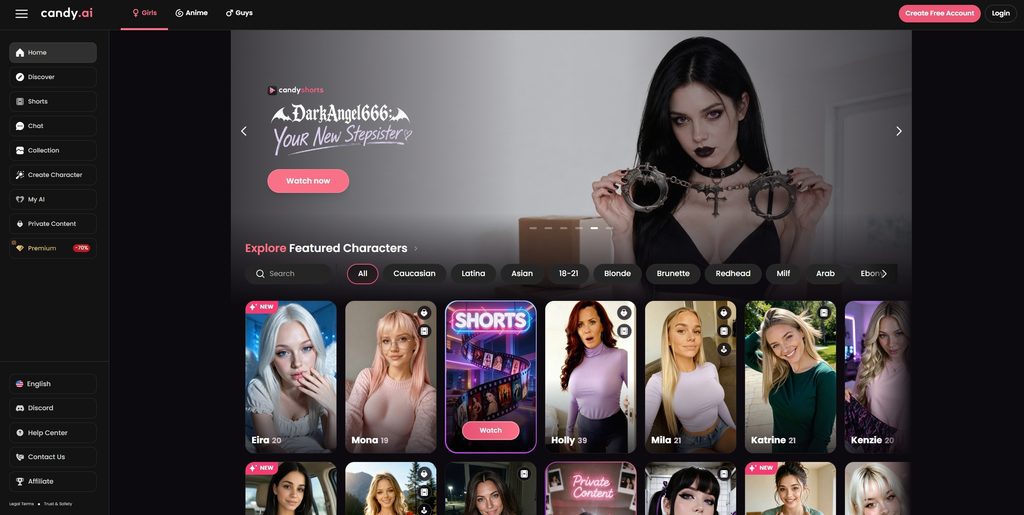
The main interface is easy to understand. Key sections include Chat, Collection, Generate Image, Create Character, My AI, and Premium, so most important tools are only one or two clicks away.
How to Create and Customize a Character in Candy AI
Candy AI puts a lot of emphasis on custom companions. Instead of choosing only a name and profile image, you can define both appearance and personality.
The creation process covers several areas:
- Visual style — Realistic or anime
- Appearance — Age presentation, ethnicity, eyes, hair
- Body — Body type and physical features
- Personality — Traits and general behavior
- Relationship — Preferred relationship style
- Background — Occupation, hobbies, backstory
- Clothing — Outfit and visual style
- Communication — Personality and interaction style
- Voice — Available character voice options
The biggest advantage is that these settings are not purely cosmetic. Candy AI says personality, relationship choices, backstory, and other character details also influence conversations and generated media.
A simple character creation flow looks like this:
- Choose a realistic or anime character style.
- Set the main physical characteristics.
- Select personality traits.
- Define the relationship type.
- Add an occupation, hobbies, and background.
- Choose a voice where available.
- Save the character and start chatting.
There is some overlap between free and Premium access. A free account can enter the character builder and test parts of the creation process. However, Candy AI lists creating your own AI girlfriends among its Premium benefits. Some parts of saving or fully using a custom character may therefore require a subscription.
The current public documentation does not clearly list every setting that can be edited after a character has been saved. It is safer to choose the main appearance and personality settings carefully during creation.

What Pre-Made Characters Does Candy AI Offer?
Candy AI says its library has over 100 characters. Individual profiles include details such as age, body type, ethnicity, language, occupation, hobbies, relationship status, and personality.
The library is useful if you do not want to spend time building someone from scratch. I could verify search and discovery tools, but I could not confirm a public system where ordinary users freely publish character cards for everyone else.
How Good Is Candy AI Chat?
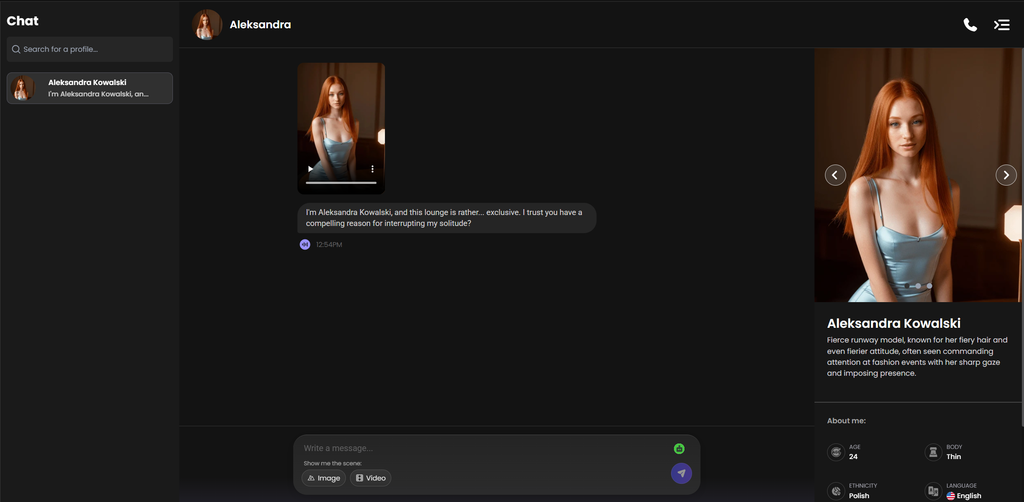
Candy AI characters start with more context than a basic chatbot. Public profiles can include a job, hobbies, personality, relationship status, and an opening scenario. This gives conversations a clearer direction from the first few messages.
The platform also says characters adapt to your tone and can remember earlier details. In practice, that should help conversations feel more personal than one-off chatbot exchanges.
Longer conversations may be less consistent. Some recent users praise the personalities and easy roleplay setup, while others mention repeated phrases or replies that become more predictable after extended use.
Candy AI also includes feedback options such as Bad Memory, Repetitive, and Out of Character. These controls make it easier to flag a reply when the character loses context or starts repeating itself.
Overall, Candy AI works best for casual conversation, flirting, and scenario-based chats. Users who expect extremely precise continuity across very long conversations may notice more limitations.
How Good Is Candy AI for Roleplay?
Candy AI supports open-ended roleplay rather than only short question-and-answer chats. Character traits, relationships, backstories, and scenarios give the AI a useful base to work from. The service also links conversations with scene images and videos.
For short scenes, that setup works well on paper because text and media stay in the same interface.
Long roleplay is harder to judge. Candy advertises long-term memory, while some public users report repetition or weaker consistency over longer chats. I would rate it as capable, but not assume that every long story will stay perfectly consistent.
How Does Candy AI Memory Work?
Candy AI advertises long-term memory as part of its companion experience. Characters are designed to retain details that make later conversations feel more connected.
According to Candy AI, remembered information can include:
- Previous conversation topics.
- User preferences.
- Personal details shared during chats.
- Recurring jokes.
- Relationship context.
- Character-specific information.
The public documentation gives fewer details about the technical side of this feature. For example, it does not clearly explain an exact context window or provide detailed public information about pinned memories and manual memory editing.
So the useful distinction is simple: long-term memory is an advertised Candy AI feature, but the platform does not publicly explain exactly how much information is stored in active conversational memory or how long every detail remains available.
Does Candy AI Allow NSFW Content?
Candy AI is designed for adults and Premium includes access to 18+ image and video generation. Adult roleplay and media are therefore part of the platform rather than a hidden feature. However, content still has limits.
Candy AI’s current policies restrict areas such as:
- Illegal content.
- Sexual material involving or resembling minors.
- Harmful violence.
- Hate content.
- Privacy violations.
- Certain impersonation and celebrity content.
- Other material prohibited by its Blocked Content Policy.
Moderation applies across text and generated media. Requests may be blocked or changed when they conflict with platform rules, and flagged content can be reviewed.
So Candy AI supports a broad range of adult content, but it still operates with content rules and moderation rather than offering unrestricted generation.
How Good Is Candy AI Image Generation?
Image generation is probably the strongest reason to choose Candy AI over a text-first companion app.
You choose an existing character or create one, then describe the image you want. The current generator has suggestions for outfit, action, pose, accessories, and scene. The live interface shows locations such as a beach, garden, bedroom, gym, restaurant, and street.
Candy’s public guide says prompts can also change clothing, poses, hair, eye color, or actions. Its live generator currently displays quantity choices up to 64 images, although actual availability and token use may depend on the account and selected mode.


The exact token price for a normal still image was not clearly exposed on the public logged-out screen I checked, so I would not put an unverified number here.
Does Candy AI Support Voice and Video?
Candy AI now extends beyond text and static images. Voice interaction, live calls, and short AI videos are available alongside regular chat, although some newer tools are still marked as beta.
Voice
Voice is part of character setup, and the platform supports voice-based interaction. More notably, public character pages now show AI Live Phone Call as a Premium feature.
At the time of this review, calls are marked beta and the public interface shows a price of 3 tokens per minute. Microphone permission is required.
That is a real live-call feature rather than simple text-to-speech. Still, beta status matters. I did not complete a live audio call, so I cannot fairly score accent quality, latency, or emotional delivery from personal testing.
Video
Video generation also exists and is currently marked beta.
A character chat can turn the current scene into a 5-second video for 12 tokens. Another current video screen includes 5- and 10-second choices and displays a 20-token request option. Because the UI does not make every duration/cost combination fully clear to logged-out visitors, the safest verified figure is the 5-second scene video at 12 tokens.

How Much Does Candy AI Cost?
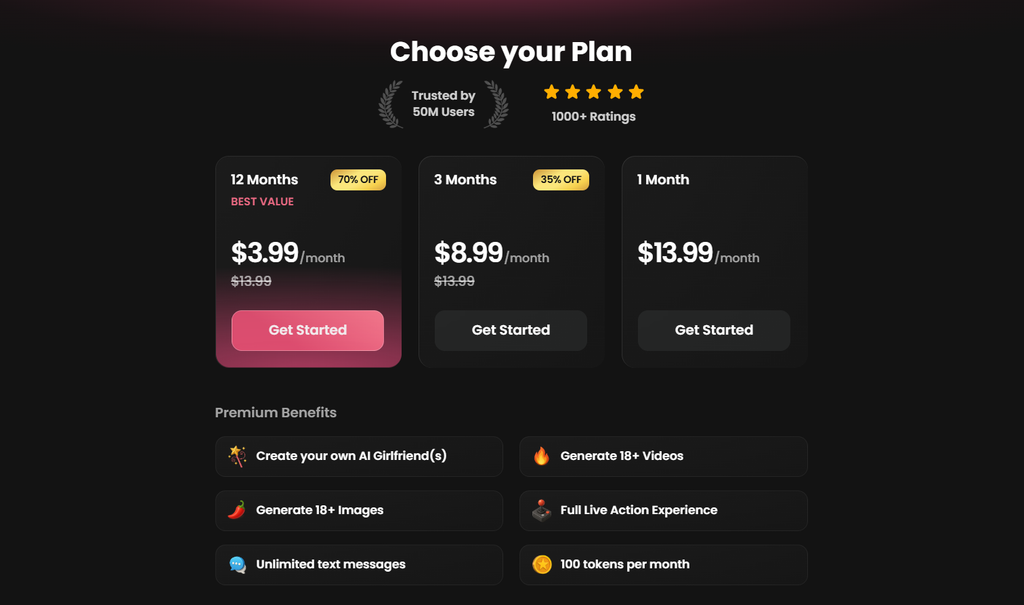
Candy AI currently offers three Premium subscription options. The longer the billing period, the lower the displayed monthly price.
The 12-month plan is the cheapest option per month, at $3.99. Candy AI labels it as its “Best Value” plan and shows a 70% discount compared with the regular $13.99 monthly rate.
The 3-month subscription costs $8.99 per month and comes with a 35% discount. It may make more sense for someone who wants a lower monthly cost without committing to a full year.
The 1-month plan costs $13.99 per month. It has no discount, but it requires the shortest commitment and is the easiest way to test Premium without paying for several months at once.
Candy AI Free vs Paid: What Do You Get?
Candy AI gives new users enough free access to inspect the interface and try a short conversation. Premium removes the main chat limit and opens the more advanced media features.
Free users can:
- Create a free account.
- Browse the character library.
- Open the character creation flow.
- Test a small number of text messages.
- View parts of the image and media interface.
The Terms currently say free accounts may generally send a maximum of five messages.
Premium adds access to:
- Unlimited text messages.
- Full custom character access.
- Premium image generation.
- AI video generation.
- Live phone calls.
- 18+ Premium media.
- Monthly Premium tokens.
The free version is enough to inspect the interface, but five messages are not enough to judge memory or long-term chat quality properly.
Is Candy AI Safe and Private?
Candy AI publishes both a Privacy Notice and Terms of Service, but users should still understand what information may be collected before sharing personal details in chats.
The Privacy Notice says Candy AI may process information such as:
- Email and account details.
- Encrypted password information.
- Screen name.
- Login provider.
- IP-related location information.
- Token balance.
- Account activity.
- Character preferences.
- User prompts.
- AI-generated outputs.
- Voice-call information.
Payment data is handled through payment providers rather than directly through the normal chat interface.
There is also an important detail about AI data use. Promotional copy and legal privacy documentation do not describe this in exactly the same way. The Privacy Notice says interactions may be aggregated, anonymized, or de-identified for AI development and moderation. It also states that preparation of some datasets can involve human review of de-identified or anonymized interactions.
Third-party AI or hosting providers may receive message content when necessary to operate the service. Flagged content may also be reviewed as part of moderation.
Account deletion does not always mean every record disappears instantly. Some information may be retained when required for operational, accounting, fraud-prevention, or legal reasons.
For better privacy, avoid sharing:
- Your password.
- Home address.
- Financial information.
- Government identification details.
- Confidential work information.
- Other information you would not want stored by an online service.
What Do Real Users Say About Candy AI?
“I’ve been on Candy AI for four months now, and yeah, I get the hype. The chats are smooth, and creating a character is actually fun. Image generation can be hit or miss sometimes, but when it works, the results are seriously good.”
“I tested Candy AI over a two-month period. Character customization was simple, and conversations generally remained consistent. The integrated image tools were convenient. Some generated images required multiple attempts, particularly with more complex prompts.”
“I started using Candy AI about six weeks ago and got comfortable with it really fast 😊 I love having chat and images in the same place. A few pictures needed another try, but I’ve had plenty of results I was happy with.”
Candy AI Pros & Cons
Candy AI has a stronger media toolkit than many simple AI companion services, but the best choice depends on whether you value those extra features enough to pay for them.
- Detailed character creator.
- Strong realistic and anime image options.
- Video generation is built into chats.
- Live AI phone calls are available.
- Large ready-made character library.
- Straightforward browser and mobile-web interface.
- Unlimited text messages with Premium.
- Premium still uses a token system for extras.
- Free chat access is very limited.
- Long-term chat quality gets mixed user feedback.
- Refund conditions can be strict.
- Privacy documentation is more complex than the marketing copy suggests.
Is Candy AI Legit or a Scam?
Candy AI appears to be a legitimate operating AI companion service.
Its Terms identify EverAI Limited in Malta under company number C107181. The service has working subscription payments, published Terms and Privacy documentation, cancellation options, support information, and stated refund rules.
Being a legitimate service does not automatically make every subscription good value for every user. Candy AI renews subscriptions automatically, Premium still uses tokens for some extras, and frequent media use can make the service more expensive.
Based on the available information, Candy AI is best described as legitimate, with some pricing and privacy points users should understand before subscribing.
FAQ About Candy AI
Can Candy AI characters initiate conversations?
Candy’s web-app interface offers notifications for “New Messages,” and the company mentions reminders and check-ins. However, the current public documentation does not clearly explain whether every character can independently start a new chat without user action.
Can I have more than one relationship on Candy AI?
You can interact with multiple characters and Premium supports creating multiple AI girlfriends. The documentation does not clearly say that relationship states are connected between different characters.
Can I restart a conversation on Candy AI?
Message management and deletion exist, but I could not verify a documented one-click “reset character and memory” function. Do not assume deleting one message resets all stored context.
Can I create different scenarios on Candy AI?
Yes. Roleplay and custom scenarios are a major part of the chat system, and the current interface can turn a scene into generated images or short videos.
Can Candy AI characters send messages without being prompted?
The site supports new-message notifications, but completely autonomous proactive messaging is not explained clearly enough in current public documentation to confirm it for every character.
Does Candy AI offer notifications or reminders?
Yes. Its web-app prompt lists notifications for new messages, new features, sales, and discounts. Candy’s product page also advertises quiet hours and daily reminders.
Can I use Candy AI on multiple devices?
Yes. Candy says the browser service works across mobile, desktop, and tablet, with account access across devices.
Does Candy AI support custom prompts?
Yes for image generation and scenario requests. You can describe outfits, actions, poses, scenes, and other details. I did not find a clearly documented separate advanced “system prompt” field for chat.
Can I export my conversations from Candy AI?
I could not find a normal chat-export feature in the current public documentation. Users covered by GDPR can request access to a copy of personal data held by EverAI, but that is different from a simple “Export Chat” button.
What happens to my chats after deleting my Candy AI account?
Account closure does not necessarily mean every record disappears at once. The Privacy Notice says some account data can be retained after closure, while users may request deletion where their legal right to erasure applies. Financial records may need to remain longer for legal reasons.