

DeepSwap is a little different from many AI services covered in this type of review. It is not an AI girlfriend app, dating platform, or chatbot. There are no relationships to build, conversations to continue, or character memories to test. Instead, DeepSwap focuses on AI face replacement and media creation.
For this DeepSwap AI review, I checked its current face-swap workflow, video tools, registration, pricing, credit use, free access, privacy documents, refund terms, and recent public feedback. I also looked at what has changed as the platform expanded beyond basic face swapping.
The result is a service that has some genuinely useful media tools, especially for video, but also a few areas that deserve more attention before you pay.
Top DeepSwap AI alternatives

She doesn't need a manual. Start talking and she'll figure out exactly what you like — your mood, your energy, your type. She adapts to you, not the other way around.


DeepSwap at a Glance: My Quick Verdict
Overall score: 7.1/10
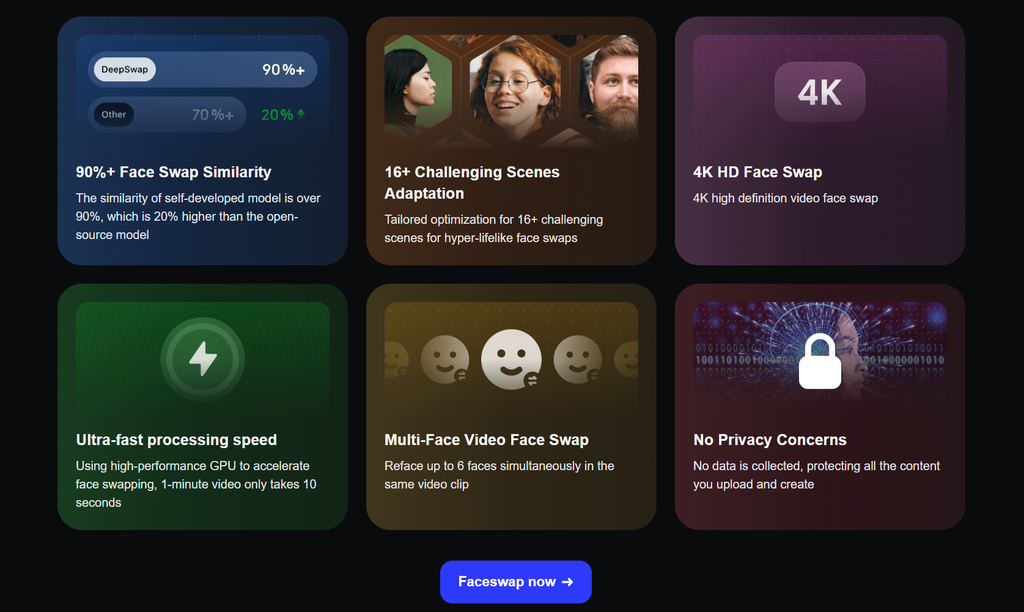
DeepSwap’s biggest strength is simple: it makes relatively advanced face replacement accessible through a browser. Current tools cover photos, GIFs, standard video, VR face swaps, multi-face projects, and AI video generation. The live face-swap page accepts videos up to 45 minutes and 1.5 GB, while DeepSwap says its system can handle up to six faces in the same video.
The main weakness is value and trust around payments. Useful video features depend heavily on credits, free access is very limited, and recent independent reviews contain repeated complaints about billing, support, and paid features.
Short explanation
- Strongest part of the platform, especially with good source material
- Built around video rather than treating it as an extra
- Supports several faces in one project
- Much broader than the original face-swap product
- Upload, choose a face, generate
- Credit use can rise quickly with video
- Useful controls, but published privacy information is not fully consistent
- Recent independent feedback raises concerns
Best for: creators who mainly want browser-based video face swaps and do not want to install or configure local AI software.
Less suitable for: someone looking for a genuinely free tool, highly predictable costs, or a platform with a very strong recent customer-service record.
What Exactly Is DeepSwap AI?
DeepSwap is primarily a web-based AI face editor. Its main tool replaces one person’s face with another in a photo, GIF, or video. The current product has grown beyond that original idea and now also lists a video generator, VR face swap, image-to-video, text-to-video, video extension, reference-to-video tools, image enhancement, background removal, and cartoon effects.
The important distinction is that DeepSwap is a media editor, not an AI companion. Features from the usual AI dating review format — chat quality, relationship memory, character conversations, voice calls, and message initiation — simply do not apply here.
DeepSwap is easiest to use through the web version. An official DeepSwap blog article published in 2026 also describes availability across web, iOS, and Android, although mobile-store branding can be confusing and should be checked carefully before downloading an app.
How to Get Started With DeepSwap AI
DeepSwap AI keeps registration fairly short. You do not have to complete a long onboarding quiz or configure a character before using the main editor. The process mainly involves creating an account, uploading media, and choosing the face you want to use.
| Step | What you do | What to expect |
| 1 | Open DeepSwap AI | Go to the face-swap tool or main dashboard |
| 2 | Create an account | Continue with Google or register by email |
| 3 | Open the face editor | Choose photo, GIF, or video |
| 4 | Upload your media | Videos can be much larger than standard image files |
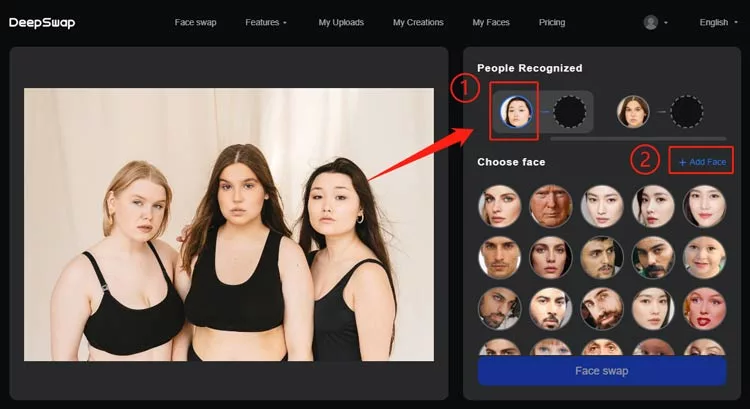
| 5 | Let DeepSwap detect faces | Detected faces appear as separate options |
| 6 | Add the replacement face | Upload or select the face you want to use |
| 7 | Generate the result | Credits may be required depending on the tool |
| 8 | Preview and save | Download the completed file if you want to keep it |
No payment card is required just to create an account.
The current upload page accepts video files up to 1.5 GB or 45 minutes, while photos and GIFs can be up to 20 MB. Users can also upload several files in one batch.
The interface does not require much explanation. Most controls are centered around uploading a file, selecting detected faces, choosing the replacement, and generating the final result.
How Does DeepSwap AI Face Swapping Work?
Face swapping remains the main feature behind DeepSwap AI. The service supports three primary formats, so you do not need a different editor for every type of media.
| Media type | Supported | Best suited for |
| Photos | Yes | Portraits, memes, profile images |
| GIFs | Yes | Short reactions and animated content |
| Videos | Yes | Social clips, scenes, longer edits |
| Multi-face video | Yes | Group scenes with several people |
| VR video | Yes | More specialized immersive content |
The workflow is based on automatic face detection. After a file is uploaded, DeepSwap identifies the people visible in the scene. You can then assign a new face to the detected subject.
The platform says it can replace up to six faces in one video. This is especially useful for group footage because each detected person can be handled separately.
Results depend strongly on the source file. Clear, front-facing faces with steady lighting usually give the model more information to work with. Side angles, partially hidden faces, rapid movement, or very small faces can cause weaker tracking.
For that reason, choosing better input footage can often improve the result more than repeatedly regenerating a difficult clip.
How Good Is DeepSwap AI for Video Face Swaps?
Video is one of the areas where DeepSwap AI stands out more clearly from basic free face-swap websites.
A photo only needs the replacement face to look convincing in a single frame. Video processing has to maintain the same identity while the person speaks, turns their head, changes expression, moves through different lighting, or passes behind objects.
DeepSwap says its system has been adapted for several difficult scene types. In practice, users should still expect occasional problems when the source footage includes:
- Fast head movement
- Strong side profiles
- Faces partly covered by hands or objects
- Rapid lighting changes
- Very small faces in the frame
- Blurry or heavily compressed video
The service also has a practical safeguard for technical failures. According to its FAQ, credits deducted for a failed generation should return automatically to the user’s balance. The transaction can be checked through Credit History.
A successfully generated video that simply does not look as good as expected is a different situation, so users should avoid treating every regeneration as risk-free.
What AI Video Tools Does DeepSwap AI Offer?
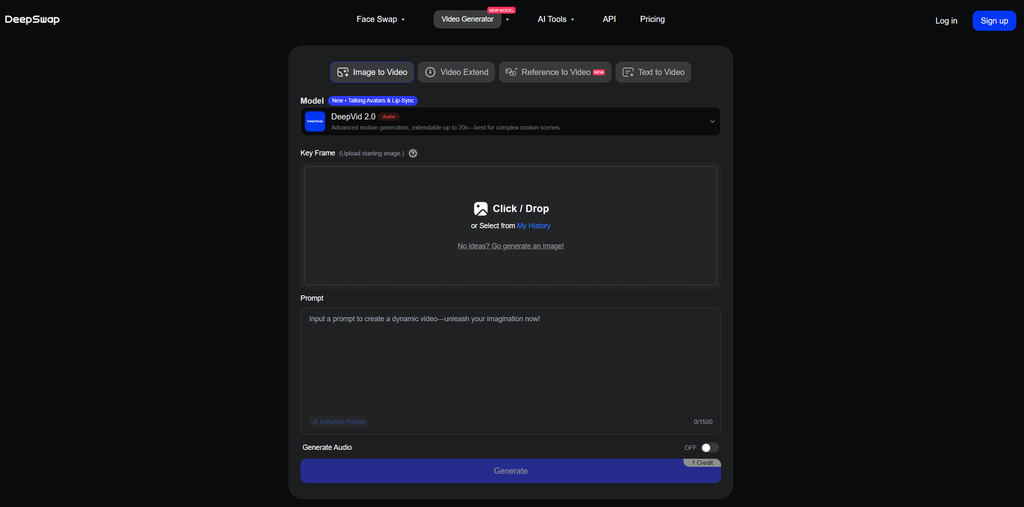
DeepSwap AI has expanded well beyond simple face replacement. The current video section now includes several generation modes for people who want to create footage from images, prompts, or existing clips.
| DeepSwap AI video tool | Main purpose |
| Image to Video | Turns a still image into a generated clip |
| Text to Video | Generates footage from a written prompt |
| Video Extend | Adds additional footage to an existing video |
| Reference to Video | Uses reference content to guide generation |
| DeepVid models | Generates short AI video clips |
| DeepEcho models | Higher-cost video generation with audio options |
This makes DeepSwap more useful as a small AI media workspace. For example, a user can create an AI clip first and then use the face-swap system as a second editing step.
The trade-off is credit use. Generative video is much more expensive than a single photo edit, so experimenting with several prompts or models can reduce a monthly balance quickly.
What Other Image Tools Does DeepSwap AI Include?
Face swapping is still the main attraction, but DeepSwap AI also includes several smaller image features.
Current tools include:
- AI Character: generates AI character images rather than conversational characters
- Image Enhancer: improves image quality and clarity
- Background Remover: separates a subject from the background
- Cartoonizer: converts photos into a more illustrated look
The AI Character label may be confusing if you are familiar with AI companion platforms. DeepSwap does not use it for a chatbot, personality, or virtual relationship. It is an image-generation feature.
These extra tools are convenient when you already have a DeepSwap subscription or credit balance. However, they are not as distinctive as the platform’s face-swap and video features.
Does DeepSwap AI Allow NSFW Content?
DeepSwap AI applies content rules to uploaded and generated material. Its Terms restrict pornographic, obscene, privacy-invasive, harmful, unlawful, and other prohibited content.
The platform also states that automated systems may identify inappropriate uploads.
In practical terms, users should expect moderation rather than completely unrestricted generation. Restrictions may affect a file before processing begins if the system detects content that conflicts with platform rules.
A few basic rules are especially important when using any face-swap service:
- Use photos or videos you have permission to edit
- Avoid impersonating someone for fraud or deception
- Do not create intimate material involving another person without consent
- Avoid uploading private media you would not want stored on an external server
- Check local laws before publishing manipulated media
These limits matter more for a face-swap platform than for an ordinary photo editor because the output can realistically represent another person’s identity.
How Much Does DeepSwap AI Cost?
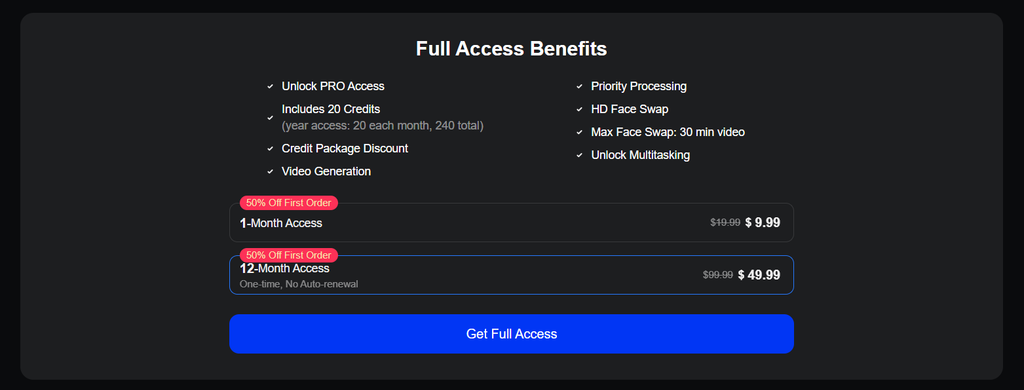
DeepSwap AI combines Premium access with a credit system. A subscription provides access to paid features, while credits are spent on individual generations.
| Plan | Current displayed price | Standard listed price | Included credits | Main benefits |
| 1-month access | $9.99 first order | $19.99 | 20 | Pro access, HD swaps, video generation, priority processing |
| 12-month access | $49.99 first order | $99.99 | 20/month, 240 total | Same Pro tools over a year |
| Extra credit packs | Varies | Varies | Depends on pack | Additional generation capacity |
The public pricing page did not expose enough reliable current information for me to verify every available standalone credit-pack price, so I would check the checkout screen before buying rather than relying on an older review.
The more useful numbers are the action costs:
- Photo face swap: 0.1 credit
- Video face swap: 1 credit per 15 seconds
- GIF face swap: 1 credit
- AI Character: 0.2 credit per photo
- Standard AI image tools: 0.1 credit per photo
- DeepVid 2.0 video without audio: 1 credit per 5 seconds
- DeepVid 2.0 audio: an extra 0.2 credit per 5 seconds
- DeepEcho 720p: 2 credits per 5 seconds
- DeepEcho 1080p: 2.5 credits per 5 seconds
Reference-to-video generation can reach 3.5 credits per five seconds at 1080p, plus the listed reference charge.
That difference matters. Twenty credits can cover many photo swaps, but high-end generated video can burn through the same balance quickly.
What Can You Use on DeepSwap AI for Free?
DeepSwap AI offers only limited access without payment, so it helps to separate what you can test from the features intended for Premium users.
Official DeepSwap materials have described limited free photo face swapping, sometimes with watermarks or daily restrictions. The current registration page, however, shows 0 face editor credit free trial, so free access can vary depending on the current offer.
A free account can still be useful for:
- Creating an account and viewing the interface
- Checking available tools and models
- Testing any free photo allowance currently shown in the account
- Reviewing pricing before purchasing
- Managing account and privacy settings
The more useful media features sit behind payment or credit use. These include:
- Longer video face swaps
- AI video generation
- HD face-swap processing
- Premium generation models
- Priority processing
- Larger or more complex projects
- Continued use after free allowances are exhausted
The limited free access is enough to inspect the platform, but it may not be enough to judge the quality of its main video features. Someone interested specifically in long-form face swapping may need to make a small purchase before properly testing the service.
How Does DeepSwap AI Handle Privacy and User Data?
Privacy deserves extra attention on DeepSwap AI because the platform processes faces rather than ordinary text prompts.
Its published Privacy Policy says the service may process several categories of information:
| Data type | Examples |
| Account information | Email address and account details |
| Uploaded media | Photos, GIFs, and videos |
| Face-related data | Facial features used during processing |
| Technical data | Device and usage information |
| Tracking data | Cookies and web-beacon information |
| Generated content | Files produced through DeepSwap tools |
DeepSwap states that the facial-feature information it processes is not treated as biometric data under its policy.
Users also have controls for deleting uploads, generated creations, and saved faces. Account deletion is available through the account area.
The wording across DeepSwap’s public pages is not perfectly consistent. For example, promotional material may use broad statements about data collection, while the Privacy Policy describes several types of information that are processed during normal use.
Retention details also vary by type of media. The current FAQ says generated creations can remain available for about one week, while uploaded files may follow different retention periods.
For sensitive content, the safest approach is to download completed work and remove files from the account when you no longer need them.
How Do DeepSwap AI Refunds and Cancellations Work?
DeepSwap AI publishes cancellation and refund information, but users should read the checkout terms carefully before paying.
The published documents currently give different refund windows. The Terms mention a possible Premium refund within 14 days when the relevant conditions are met, while the separate Refund Policy refers to 7 calendar days.
Other restrictions may also apply, especially once Premium benefits or purchased credits have already been used.
Before buying, it is worth taking three simple precautions:
- Check the refund terms shown during your actual checkout.
- Save a screenshot or receipt with the billing conditions.
- Confirm whether your chosen payment method enables automatic renewal.
Web subscriptions can generally be managed through the account section. DeepSwap also explains that some payment methods may not support automatic renewal at all, so the subscription toggle does not always appear.
What Real Users Are Saying
“I’ve been using DeepSwap for like six months now, mostly for quick edits and random experiments. Ngl, it saves a ton of time compared with doing everything manually. Good source pics can look crazy clean. Bad lighting or weird angles? Yeah, those can totally mess things up.”
“I used DeepSwap periodically for approximately six months. The workflow is efficient and requires limited manual editing. Results were most consistent with clear, high-resolution source material. Complex angles and poor lighting reduced output quality.”
“I’ve been using DeepSwap for several months now 😊✨ I really like how fast and simple the whole process feels. Clear photos usually give me great results 👍 Some difficult angles can be tricky, but switching the source image normally helps a lot 😄📸”
DeepSwap Pros and Cons
DeepSwap AI performs especially well when the priority is video face replacement rather than general-purpose AI editing. Its strongest and weakest points are easier to see side by side.
- Strong focus on video face swapping rather than photos alone
- Supports photos, GIFs, regular video, VR swaps, and AI video generation
- Multi-face swapping for up to six faces
- Simple browser workflow with little technical setup
- Large current upload limits
- Clear published credit costs for individual tools
- Useful image-to-video and text-to-video expansion
- Very limited free testing
- Video generation can consume credits fast
- Privacy documents contain conflicting retention details
- Refund pages disagree on whether the request window is 7 or 14 days
- Good results still depend heavily on source-face angle and quality
Is DeepSwap Legit or a Scam?
DeepSwap appears to be a real, operating AI service rather than a fake website. The platform has an active product, current pricing and generation tools, published Terms, a Privacy Policy, refund documentation, support contact details, account deletion options, and years of public operation.
That does not mean every customer experience is good.
The public Company Info page contains little more than a customer-support address, while recent Trustpilot feedback raises serious concerns about billing, credits, refunds, and support.
My conclusion is therefore: DeepSwap is a legitimate operating service, but with important limitations and a recent reputation that justifies caution before buying a long subscription.
The best approach is to start with the smallest purchase available, save screenshots of the checkout terms, check whether auto-renewal is enabled, and avoid consuming credits until you are sure you want to keep the purchase.
FAQ About DeepSwap AI
Can DeepSwap swap several people in one video?
Yes. DeepSwap says its multi-face video tool can replace up to six faces in the same clip.
Can I reuse a face I uploaded before?
Yes. DeepSwap provides a saved-face area and allows users to remove stored faces from their account.
Does DeepSwap have an AI chatbot?
No current DeepSwap product documentation shows a normal AI companion or conversation feature. Its main products are face swapping, image tools, and AI video generation.
Can I create AI videos without first uploading a video?
Yes. DeepSwap currently offers image-to-video and text-to-video generation as well as reference-based video creation.
What happens when a generation fails?
DeepSwap says credits deducted for a failed generation should automatically be returned. Users can verify this through Credit History.
How long does DeepSwap keep my generated files?
The current FAQ says generated creations are stored for one week. Its upload-retention rules are different, so download finished work you want to keep.
Can I delete my DeepSwap account?
Yes. The current FAQ says account deletion is available through the account menu on the web version or app. Deletion is permanent.
Is DeepSwap completely free?
No. Current official sources describe only limited free photo access, while major video and Premium tools require payment or credits.
Is DeepSwap worth paying for?
It makes the most sense if video face swapping is your priority and you value a browser-based workflow. If you only need occasional photo swaps, the subscription and credit system is harder to justify.
Who should skip DeepSwap?
Users who need extensive free testing, predictable unlimited video generation, or very strong customer-service guarantees may be more comfortable with another tool.