

Cuties AI was built around a simple idea: create an AI girlfriend, customize her look and personality, then chat, request images, listen to voice replies, or turn generated photos into short videos.
On paper, that made it much more than a basic chatbot. Its character builder and media tools were the parts that caught my attention most.
There is one major issue with reviewing Cuties AI in 2026, though. The official cuties.ai domain no longer presents the old Cuties AI interface. It currently returns a page branded as Lovescape. I looked at independent hands-on tests, user feedback, pricing, and the serious data breach reported in 2026.
Top Cuties AI alternatives

She doesn't need a manual. Start talking and she'll figure out exactly what you like — your mood, your energy, your type. She adapts to you, not the other way around.


Cuties AI Score Card: The Short Version
Cuties AI had a stronger media package than its chat quality alone would suggest. Character creation, images, voice, and photo-to-video tools gave users plenty to play with.
The main weakness is now much harder to ignore: privacy. A reported 2026 breach exposed data linked to roughly 144,000 email addresses, including prompts and URLs to generated content.
Overall rating: 5.8/10
Short explanation
- Fine for casual chat, but repetition was reported
- Reports about long-term memory are mixed
- One of the service’s stronger areas
- Good controls, but inconsistent faces and video motion
- Voice messages and calls added more variety
- Subscription looked affordable, token extras could add up
- Simple web interface and clear character setup
- The 2026 breach is a serious concern
It made the most sense for users who cared about creating characters and generating media. Anyone mainly interested in deep conversation, long-term memory, or strong privacy protections had better reasons to look elsewhere.
What Is Cuties AI and What Has Changed in 2026?
Cuties AI was an adult-focused AI companion platform built around custom virtual partners. Users could chat with characters, create their own AI companions, generate images, use voice features, and turn selected images into short videos.
It worked mainly as a browser-based AI girlfriend and roleplay service rather than a general chatbot.
The current situation is less straightforward. The original Cuties AI interface is no longer clearly presented through the official domain, which now shows different branding. Because of this, older Cuties AI features should not automatically be treated as currently available.
Current public materials also do not confirm an active native Cuties AI app for iOS or Android. The service was primarily designed for browser use, including mobile browsers.
How to Get Started With Cuties AI
The previous Cuties AI setup was relatively short. Users could create an account, choose an existing character, or build a custom companion before opening the chat.
The usual process looked like this:
- Open Cuties AI and select the registration option.
- Create an account with an email address.
- Enter the main dashboard and browse available AI characters.
- Choose a pre-made companion or open the character creator.
- Set character preferences such as appearance and personality.
- Open the chat and start the first conversation.
- Upgrade if needed when free limits are reached.
A payment card was not required simply to create a basic account, as a limited free option was available.
The service was intended for adults. However, current official materials do not clearly document whether Cuties AI used full identity-based age verification or a simpler age-confirmation system.
The web interface itself was fairly easy to understand. Characters were shown visually, the main tools were separated clearly, and getting from account creation to a conversation did not require a long onboarding process.
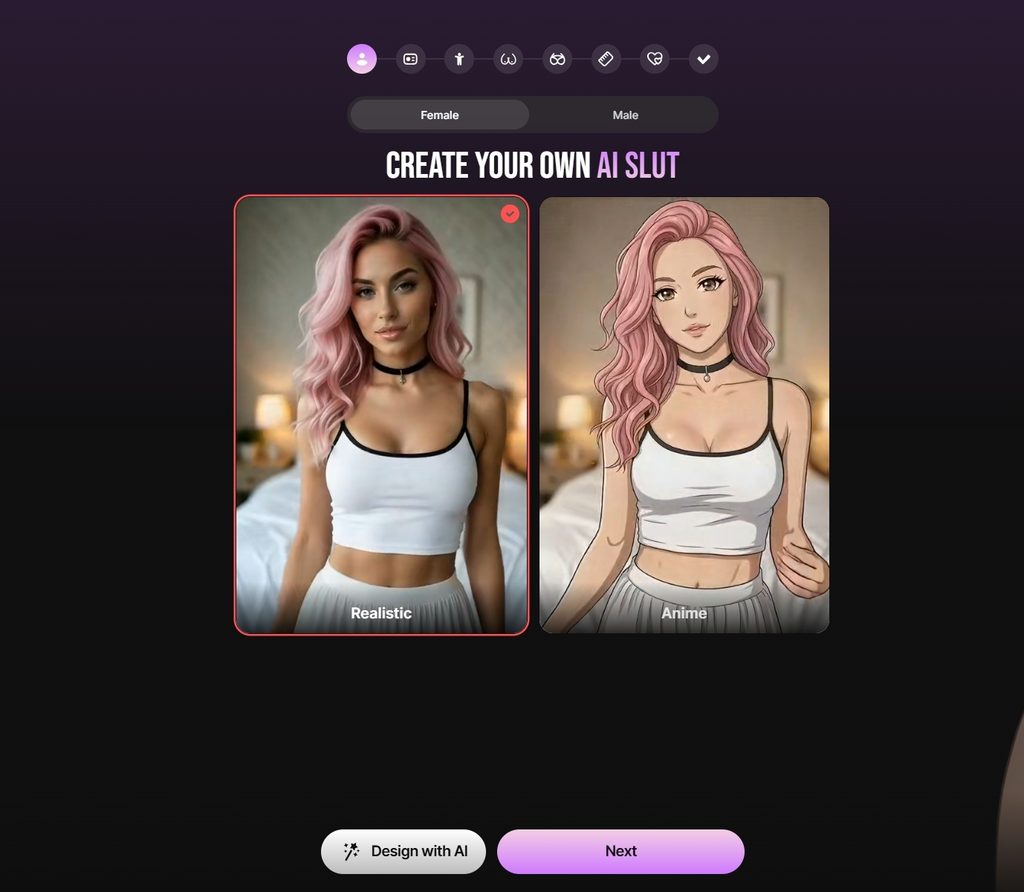
How Does Cuties AI Character Creation Work?
Character creation was one of the stronger parts of Cuties AI. The platform offered considerably more control than services that only let you select a picture, name, and basic personality.
The main customization areas included:
| Customization area | Available options |
| Visual style | Realistic, semi-realistic, cartoon, hentai |
| Appearance | Ethnicity, hair, eyes, age, body details |
| Personality | Traits and general character style |
| Relationship | Type of connection with the user |
| Background | Backstory and character information |
| Interests | Hobbies and preferences |
| Role | Job, occupation, or general character role |
| Communication | Personality and interaction preferences |
| Voice | Multiple selectable voice options |
| Extra details | Additional custom character information |
This made it possible to create characters that felt noticeably different before the first chat even started.
The process was usually:
- Choose the visual style.
- Set physical features.
- Pick personality traits.
- Add interests and a role.
- Define the relationship.
- Write or select backstory details.
- Choose a voice.
- Review and create the character.
The character builder gave users plenty of initial control, although editing options after creation appeared more limited. Users interested in experimenting with different personalities could create multiple companions rather than relying on a single AI girlfriend.
What Pre-Made Characters Does Cuties AI Offer?
Creating a character was optional. Cuties AI also offered a library of ready-made companions for users who wanted to start chatting immediately.
The library included several visual styles, such as:
- Realistic characters
- Semi-realistic characters
- Cartoon characters
- Hentai-style characters
Previous independent testing showed more than 100 characters at one point, but this number was never a fixed official catalog size and should not be treated as the current total.
Discovery tools were fairly simple. Filters focused mostly on broad character categories and gender rather than providing a highly detailed search system.
How Good Is Cuties AI Chat?
Cuties AI chat worked best in shorter, casual conversations.
Initial responses were usually an appropriate length and could feel warm and personal. Characters generally followed the tone selected during creation rather than replying with extremely short or generic answers from the start.
Longer conversations were less consistent.
Some tests showed reasonable continuity when the same companion was used repeatedly. Other users reported repeated phrases, forgotten information, odd replies, and situations where a character stopped following previous details.
The available evidence suggests that Cuties AI was more convincing for:
- Casual flirting
- Short romantic conversations
- Simple roleplay
- Fantasy scenarios
- Conversations supported by generated images
It was less reliable for long-running conversations where users expected the AI to remember many events and personal details.
This difference is important because the service offered strong visual and customization tools, while the underlying conversation memory was not equally advanced.
How Good Is Cuties AI for Roleplay?
Cuties AI supported romantic and adult roleplay, with custom character traits and backstories giving users a good starting point for different scenarios.
The AI could generally:
- Follow straightforward scenarios
- Stay within its assigned role during shorter chats
- Respond to custom character backgrounds
- Combine roleplay with generated images
- Handle romantic and adult conversations
Longer scenes were more unpredictable. Characters could forget earlier details or move the story forward too quickly.
The service also applied content restrictions to some prompts and scenarios. Adult content was supported, but filters could still appear depending on the wording or type of request.
For short fantasy scenarios, Cuties AI worked reasonably well. Complex stories with many events were more likely to expose limitations in memory and continuity.
How Well Does Cuties AI Memory Work?
Memory was not one of the platform’s most consistent features.
Some independent testing described acceptable continuity when users stayed with the same character. Other reports described forgotten details, repeated questions, or changes in behavior during longer conversations.
Current Cuties AI documentation does not provide enough detail about:
- Exact context length
- Permanent memories
- Pinned memories
- User-editable memory
- Memory reset controls
- Free versus paid memory limits
One notable exception is the Ultra plan. The current pricing interface specifically lists Advanced AI chat memory as one of its additional benefits.
That suggests memory is treated as a premium feature at the highest tier, although the interface does not explain exactly how much more information Ultra can retain.
Does Cuties AI Allow NSFW Content?
Yes. Cuties AI was designed for adult users and included an explicit NSFW mode among its paid features.
Adult functionality covered several areas:
- NSFW text conversations
- Adult roleplay
- Generated images
- Character customization
- Adult-oriented character styles
Still, content moderation existed. Certain prompts, words, or scenarios could be blocked even within adult conversations.
The current subscription pages also list Hot roleplays and NSFW mode as included features across Premium, Creative PRO, and Ultra.
So Cuties AI supports adult content, but users should expect some platform rules rather than assume every possible request will be accepted.
How Good Is Cuties AI Image Generation?
Image generation was one of the more developed Cuties AI features.
Users could generate pictures directly from chats or use a separate creation tool with additional settings.
Available controls included options such as:
- Character
- Custom prompt
- Scene
- Mood or vibe
- Pose
- Clothing
- Action
- Camera angle or view
This gave users more control than a basic request such as asking the character to send a photo.
Generated images generally kept the main appearance of the selected character, although facial details could change between generations. This made the tool better for casual fantasy content than for users who need perfect visual consistency across a large image collection.
Image generation is currently listed as part of all three paid subscription tiers.
What Voice and Video Features Does Cuties AI Offer?
Cuties AI also extended the companion experience beyond text and static images. Voice and video features are included in its current paid plans, although some actions may consume chips.
How Does Cuties AI Voice Work?
The platform supported voice messages and offered multiple voice choices during character creation.
Voice could make conversations feel more personal, especially for users who did not want every interaction to stay text-based.
Available functionality included:
- Character voice selection
- AI voice messages
- Spoken responses
- Voice-based companion interactions
The pricing interface currently lists Voice messages as part of Premium, Creative PRO, and Ultra.
Some previous versions of the service also charged chips for voice-related actions, so users who rely heavily on audio should keep an eye on their chip balance.
Can Cuties AI Generate Videos?
Yes. Cuties AI included video generation alongside its image tools.
The typical process started with an existing AI-generated image. Users could then select an animation preset or provide instructions to turn the image into a short moving clip.
The feature worked best with relatively simple movement. More complex custom motion could produce less natural results.
Current subscription pages list Generate images & videos across all three paid tiers, confirming that video remains part of the paid feature package.
How Much Does Cuties AI Cost?
Cuties AI currently offers three subscription tiers: Premium, Creative PRO, and Ultra. Premium and Creative PRO have several billing periods, while Ultra is sold as a lifetime plan.
Users should also pay attention to chips. Subscriptions include a monthly chip allowance, while additional chips can be purchased separately.
Cuties AI Premium
Premium is the cheapest paid option. There are three billing periods:
| Premium plan | Price | Discount | Billing |
| 1 month | $19.99/month | — | Monthly |
| 3 months | $12.99/month | 35% off | Every 3 months |
| 12 months | $7.99/month | 60% off | $95.88 per year |
The annual plan gives the lowest monthly price. The checkout screen states that the $95.88 annual payment renews every year and can be canceled at any time.
Creative PRO
Creative PRO is much more expensive, but it is clearly aimed at users who generate and publish more content.
| Creative PRO plan | Price | Discount | Billing |
| 1 month | $64.99/month | 35% off | Monthly |
| 3 months | $49.99/month | 50% off | Every 3 months |
| 12 months | $24.99/month | 75% off | $299.88 per year |
The annual option cuts the displayed monthly price to $24.99. According to the payment screen, users choosing this option are billed $299.88 every year.
Ultra: A Lifetime Option
Ultra works differently from the other two plans. There is no monthly or annual subscription.
The current offer shown in the interface is:
- Lifetime access: $399.60 one-time payment
- Regular displayed price: $999
- Current displayed discount: 60% off
The one-time price is high, but the plan may make more sense for a heavy long-term user than paying for Creative PRO year after year. Still, that depends heavily on how often someone uses the media tools and whether the monthly chip allowance is enough.
What Is Free on Cuties AI and What Requires Payment?
Cuties AI lets users see part of the platform before committing to a subscription. The free experience is useful for testing the general concept, while most advanced media and adult features are tied to paid access.
The previously documented free version included:
- Limited text chat
- Limited character creation
- Limited image generation
- Access to basic character browsing
- Enough functionality to test the interface
Current subscription pages place the main advanced tools behind Premium, Creative PRO, or Ultra:
- AI character creation with expanded access
- Image and video generation
- Hot roleplays
- Voice messages
- NSFW mode
- Top AI generation models
- Publishing and sharing characters
- Larger monthly chip allowances
Ultra adds two notable benefits not shown on the lower tiers: advanced AI chat memory and no-watermark downloads.
The free version can help users understand how Cuties AI works, but regular chat and media use will likely require a paid plan.
Is Cuties AI Safe? Privacy and Data Security
Privacy is one of the most important issues to consider before using Cuties AI.
Have I Been Pwned reported a Cuties AI data breach disclosed in March 2026. Around 144,000 unique email addresses were affected. Exposed information reportedly included display names, avatars, prompts and descriptions used for image generation, generated-content URLs, and account-related preference data.
This is particularly important for an adult AI companion service because prompts and generated media can contain highly private information.
The currently available Cuties AI materials do not provide enough detail to confidently assess every part of its present data-handling setup, including exact chat retention periods and backup deletion schedules.
Users can still reduce personal risk with a few basic precautions:
- Use a separate password for Cuties AI
- Avoid uploading identifiable personal photos
- Do not share home addresses or financial information
- Keep highly sensitive personal details out of chats
- Review account and privacy options regularly
- Delete unused characters and media when possible
The breach does not automatically mean every current account will be compromised, but it is a significant factor when comparing Cuties AI with other AI companion platforms.
What Real Users and Testers Report
“I’ve been on Cuties AI for maybe six weeks. It’s not overloaded with complicated stuff, which I actually like. You can pick a character and get started fast. Some replies feel a bit basic, but for casual chats, it does the job really well.”
“I tested Cuties AI for approximately two months. The platform is easy to use and requires minimal onboarding. Character selection and chat access are straightforward. Advanced customization options are somewhat limited, although the simplified interface supports casual use effectively.”
“I’ve used Cuties AI for about a month, and I like how simple everything feels 😊 I didn’t need to spend ages setting things up. I’d love a few more customization options, but for relaxed chats, it’s been really easy to use.”
Cuties AI Pros & Cons
Cuties AI combines several companion and media tools in one account. Its strengths are mostly related to customization and content creation, while privacy, memory, and chip-based usage are the main areas to consider before paying.
- Detailed character creator
- Realistic, semi-realistic, cartoon, and anime-style options
- Image generation inside chat and through a separate creator
- Voice messages and voice calls
- Photo-to-video generation
- Simple browser-based interface
- Free access was available before upgrading
- Long-term memory received mixed reviews
- Character faces could change across generated images
- Video motion sometimes looked unnatural
- Extra media features consumed tokens
- Adult chat still used filters despite the platform’s branding
Is Cuties AI Legit or a Scam in 2026?
Calling Cuties AI a scam would go further than the available evidence supports.
It was a functioning service with real character creation, subscriptions, chat, images, voice, and video features. Independent reviewers were able to create accounts and pay for Premium access.
However, I would not describe its current position as normal or reassuring either.
The official Cuties.ai domain now presents Lovescape branding, the old product pages are difficult to verify, the public review base is very small and negative, and the service suffered a significant privacy breach in 2026.
My conclusion: Cuties AI was a legitimate operating AI companion platform, but its current status is difficult to verify and significant privacy concerns exist.
If a new Cuties-branded payment page appears, I would check who operates it, read the current terms, and confirm cancellation rules before subscribing.
FAQ About Cuties AI
Can Cuties AI characters initiate conversations?
I could not find current official documentation confirming proactive messages without a user prompt.
Can I have more than one relationship on Cuties AI?
Yes, the previous service supported multiple created and community characters. Premium documentation reviewed by third parties referred to multiple generated AI girlfriends.
Can I restart a conversation?
The former interface supported chat management, but I could not confirm a current dedicated restart button.
Can I create different scenarios?
Yes. Character backstories, role settings, free-text prompts, and roleplay supported different scenarios in the previous version.
Can characters message me without being prompted?
Current documentation does not clearly confirm this.
Does Cuties AI offer notifications or reminders?
I could not verify a current notification or reminder system.
Can I use Cuties AI on several devices?
The old service was web-based, so account access through different browsers was possible in principle. Current multi-device rules are not clearly documented.
Does Cuties AI support custom prompts?
Yes, for image generation and character details. The dedicated image creator supported free-text prompts alongside presets.
Can I export my Cuties AI conversations?
I found no reliable documentation confirming a chat-export feature.