

Chub AI is a little different from the usual AI girlfriend sites. It is closer to a large character and roleplay platform where you choose not only who you talk to, but also how the AI behind that character works.
For this Chub AI review, I checked the current website, official documentation, subscription page, registration flow, Terms of Service, Privacy Policy, API documentation, and recent community feedback. The big question is simple: does all that extra control make Chub better, or just harder to use?
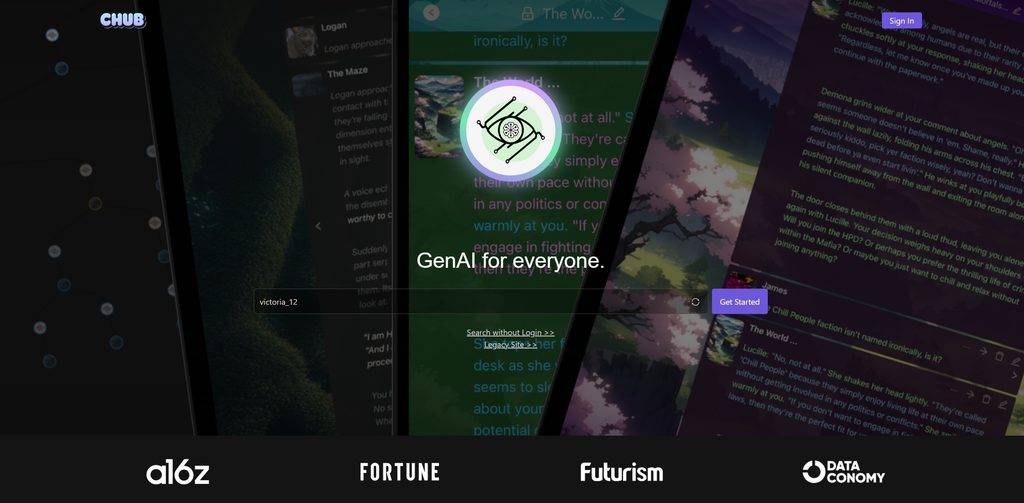
Chub AI Quick Verdict: Is It Worth Using?
Chub AI’s strongest point is control. You can create detailed characters, use community-made bots, change models, work with Lorebooks, build branching chats, adjust generation settings, and even connect outside AI providers.
Its complexity is also one of the main trade-offs. There are lots of settings, technical terms, prompts, model choices, and advanced tools. Someone who only wants to pick an AI companion and start chatting may find Chub harder to learn than simpler alternatives.
Short explanation
- Can be very good, but quality depends heavily on the model and preset
- Good context tools and Lorebooks, but not effortless long-term memory
- One of Chub’s strongest areas
- Images plus a surprisingly broad multimedia system
- Voice and TTS tools exist, though documentation is less beginner-friendly
- Unlimited $20 plan can be good value for heavy users
- Functional, but there is a real learning curve
- Strong private-chat promises, weaker safety controls
Top Chub AI alternatives

She doesn't need a manual. Start talking and she'll figure out exactly what you like — your mood, your energy, your type. She adapts to you, not the other way around.


What Chub AI Actually Is
Chub describes itself as a platform for interacting with AI characters through large language models. It also openly describes the service as uncensored within its rules.
That makes it more of an AI roleplay toolkit than a standard AI dating app.
Users can browse community characters, make their own character cards, create personas, attach Lorebooks, build presets, start multi-character chats, branch conversations, and choose which AI model powers the response. The platform can also work as a frontend for outside APIs.
Chub works primarily through the web. Older official documentation refers to iOS and Android support, but as of August 2026 I could not verify a currently downloadable official mobile app. Apple’s current Chub AI Inc. developer page exists but shows no live application listing, so the browser version is the safest option to recommend right now.
How to Get Started With Chub AI
Getting from the homepage to a first conversation does not take many steps. Chub skips the long compatibility questionnaires common on some AI companion sites.
The basic process looks like this:
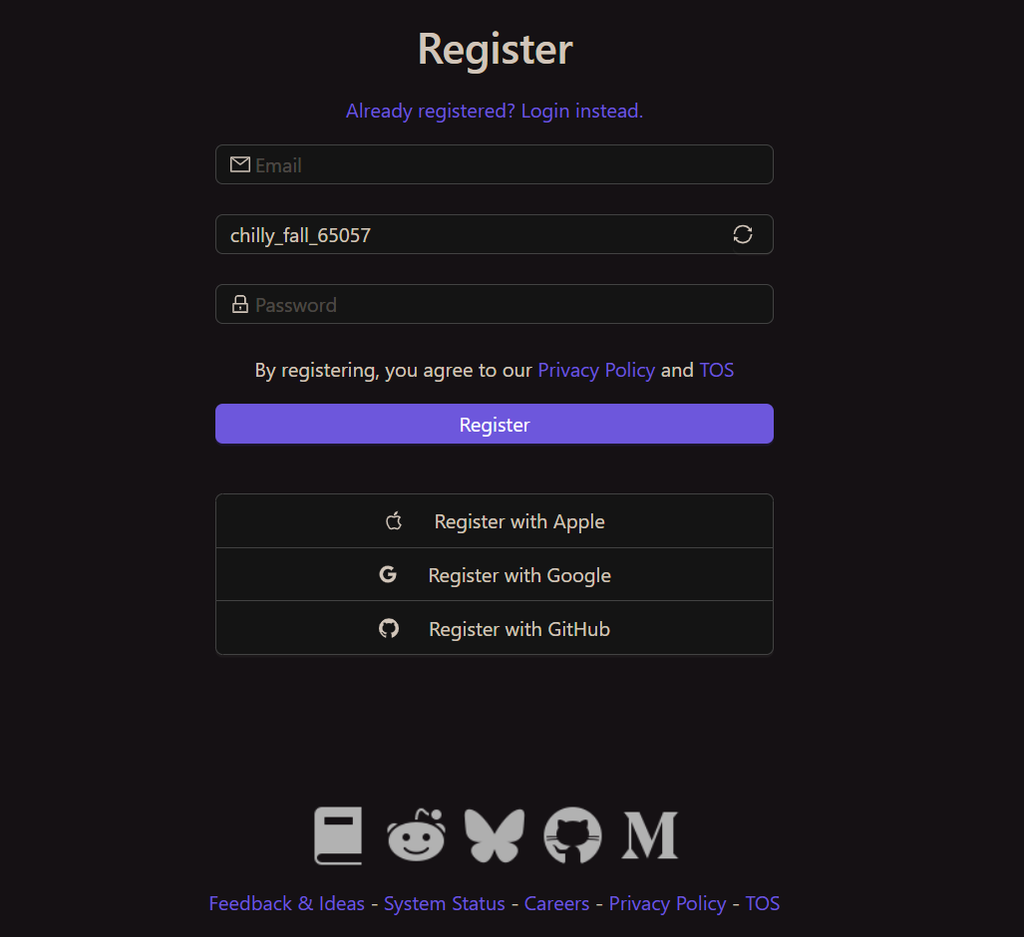
The current registration page supports Apple, Google, and GitHub sign-up options alongside the standard account system. A payment card is not required just to register.
There is also no long personality quiz before you can use the main platform.
The service is strictly 18+. Its Terms state that people under 18 cannot register or use Chub. An Australian eSafety investigation later raised concerns about how strongly this age rule was technically enforced during the reviewed period.
How to Create and Customize a Character on Chub AI
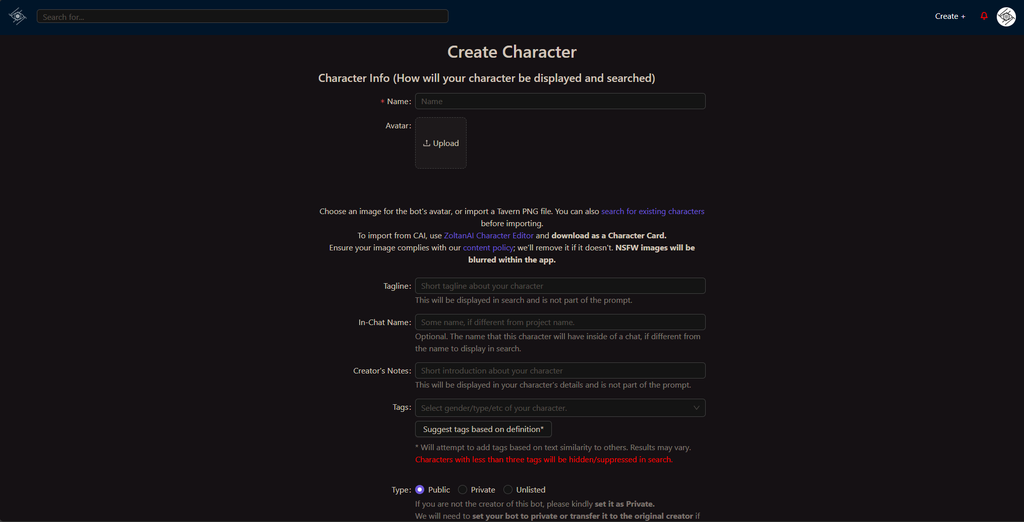
Character creation is one of the areas where Chub offers much more control than a typical AI girlfriend platform.
Instead of relying mainly on visual sliders, Chub lets you define how the character should act, speak, and fit into a scenario.
A typical character setup can include:
| Character setting | What it controls |
| Name | The character’s identity |
| Description | Personality, appearance, background, and important traits |
| Initial greeting | The first message shown when a chat starts |
| Scenario | The setting or relationship context |
| Example dialogue | Examples of how the character should speak |
| Alternate greetings | Different openings for new conversations |
| Lorebook | Additional world, relationship, or story information |
| Tags | Helps categorize and discover the character |
| Visibility | Controls whether the character is private or shared |
These fields affect the actual prompt sent to the model. A detailed card can therefore make a noticeable difference to tone, consistency, and roleplay quality.
Characters can also be updated, forked, linked to Lorebooks, shared publicly, favorited, and paired with different presets.
The Community Library May Be More Important Than the Builder
You do not need to make a bot yourself.
Chub has a large user-made library built around characters, tags, presets, Lorebooks, creators, ratings, favorites, and search tools. The public API also exposes tags and project ratings, which shows how much of the platform is built around community content.
Quality varies. Some cards contain detailed scenarios and carefully written examples. Others are much more basic.
That is worth remembering when judging the chat. A weak character card can make even a capable model feel generic.
How Good Is Chub AI Chat Once Everything Is Set Up?
There is no single Chub AI model or personality that defines every conversation. Results depend on the character card, selected model, context size, preset, system prompt, generation settings, and any connected outside API.
That flexibility can produce detailed conversations, especially when a well-written character card is paired with a suitable model. At the same time, users sometimes report repetition or noticeable quality changes after switching models.
Chub also gives users unusually detailed control over response generation. Available settings include:
- Temperature;
- Frequency penalty;
- Presence penalty;
- Top K;
- Top P;
- System prompts;
- Post-history instructions.
These options can change response length, creativity, repetition, and how closely the AI follows the character card.
Another useful feature is the chat tree. Instead of replacing a previous message permanently, you can create alternative conversation branches and return to an earlier path later.
For roleplay and experimental chats, this is one of Chub’s most useful tools.
How Good Is Chub AI for Roleplay?
Roleplay is where many of Chub’s advanced settings become genuinely useful.
A roleplay setup can combine:
- Detailed character descriptions;
- Scenarios;
- Example dialogue;
- Alternate greetings;
- Lorebooks;
- User personas;
- Custom prompts;
- Generation presets;
- Multiple characters;
- Branching chats;
- Stages.
This gives users more control over a story than a basic companion chat usually provides.
Performance still depends heavily on the model. In stronger sessions, the AI can maintain a character voice, continue a scene, and introduce new details naturally. In weaker sessions, it may repeat phrases, rush events, forget earlier information, or shift personality.
How Does Chub AI Memory Work?
Chub’s memory system is based largely on context management rather than a single automatic long-term profile.
The model receives previous messages until the available context window fills up. Older information may eventually fall outside that active context.
Chub offers several tools that can help:
| Memory tool | Purpose |
| Chat context | Keeps recent messages available to the model |
| Lorebooks | Adds stored facts when relevant keywords appear |
| Character card | Keeps important personality and background information |
| Scenario | Maintains the basic setting of the conversation |
| Example dialogue | Reinforces speaking style and behavior |
| Presets/prompts | Helps guide how the model interprets context |
Lorebooks are especially useful for longer stories. They can store relationship details, locations, world rules, recurring characters, or past events without forcing every fact into each message.
The system gives advanced users good control, but it requires more manual setup than companion apps with automatic memory profiles.
Does Chub AI Allow NSFW Content?
Chub supports adult-oriented roleplay and provides controls for NSFW content. However, adult access is still subject to platform rules.
The main points are:
- Users must be 18 or older.
- Adult roleplay between adults is supported.
- NSFW controls are available.
- Content involving minors is prohibited.
- Explicit material involving real people is subject to additional restrictions.
- Rules may differ depending on the model or outside API connected to Chub.
Users should also be aware that regional availability can change. Chub previously withdrew its service from Australia during regulatory action involving the country’s eSafety Commissioner.
How Does Chub AI Image Generation Work?
Image generation is available through Chub’s Imagine system and can be accessed from a conversation.
The broader Chub media infrastructure currently includes tools for:
- Text-to-image generation;
- Image-to-image generation;
- Inpainting;
- Background removal;
- Upscaling;
- Animation;
- Expression generation;
- Music;
- Sound effects;
- Speech;
- Voice cloning;
- 3D generation;
- Video.
This gives Chub a wider media toolkit than many character-chat platforms.
The main limitation is documentation. Some advanced media functions are exposed through Chub’s API documentation but are not explained in the same detail for ordinary web users.
Does Chub AI Support Voice and Video?
Chub is not limited to text and still images. Its current infrastructure includes several audio and video-related tools, although some are more visible through the API than through the standard chat interface.
What Voice Features Does Chub AI Offer?
The current subscription includes voice functionality, while Chub’s API documents tools such as:
- Text-to-speech;
- Speech-to-text;
- Voice management;
- Voice cloning;
- Live voice endpoints.
These features give Chub more flexibility than platforms that only convert a character’s message into basic audio.
The public documentation does not provide a complete consumer-facing list of every available voice, language, accent, or latency level, so those details are best checked directly in the current interface.
Can Chub AI Generate Videos?
Chub’s current infrastructure includes video-from-prompt and image-animation endpoints.
Video is therefore part of the wider Chub media system, although it is not presented as prominently as character chat or the Imagine image tools.
For most users, video currently feels more like an additional multimedia capability than the central feature of the platform.
Chub AI Pricing in 2026: The $20 Plan Is Now the Main Offer
This is one area where older Chub AI reviews are already outdated.
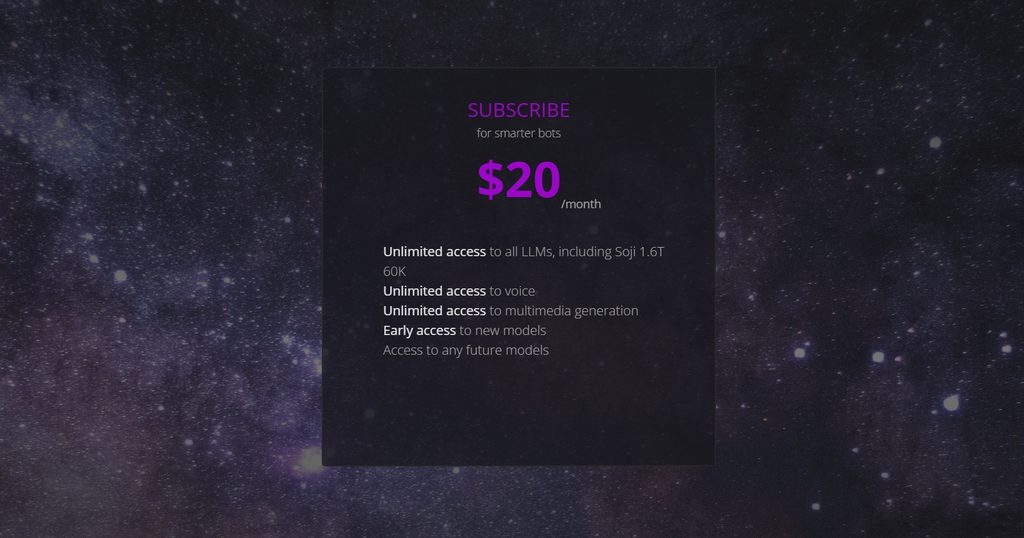
The live Chub subscription page currently advertises a $20/month subscription with unlimited access to its LLMs, including Soji 1.6T 60K, plus unlimited voice and multimedia generation.
Older $5 Mercury pricing still appears in old guides and reviews, but the current public subscription page no longer advertises that plan.
Chub also supports a bring-your-own-key setup, so paying Chub itself is not the only way to use the interface.
There is one current pricing detail worth flagging. Recent Chub community posts from July and August 2026 report that Mercury was removed, free usage was cut to around 20 messages per day, and new web subscriptions moved toward crypto payments. The removal of Mercury matches the live subscription page, but Chub’s public pricing text does not clearly document the 20-message cap or payment method. I would therefore treat those two points as current user-reported conditions rather than permanent published terms.
Refund terms are clearer: Chub says refunds are not normally provided unless the company explicitly grants one.
What Do You Get With Chub AI Free vs Paid?
The difference between free and paid access is mainly about hosted AI usage and premium multimedia features. Many of Chub’s character-management tools can still be explored without immediately buying a subscription.
Free users can generally:
- Browse public characters;
- Create an account;
- Build characters;
- Configure prompts and presets;
- Use character and chat-management tools;
- Connect supported external APIs;
- Use the hosted trial or free allowance currently offered.
Paid access mainly covers:
- Unlimited use of included premium hosted models;
- Access to the current Soji model;
- Included voice functionality;
- Multimedia generation;
- Other subscription-based hosted resources.
What Can You Do on Chub AI for Free?
Free users can generally:
- Browse public characters;
- Create an account;
- Build characters;
- Configure prompts and presets;
- Use character and chat-management tools;
- Connect supported external APIs;
- Use the hosted trial or free allowance currently offered.
What Requires a Chub AI Subscription?
Paid access mainly covers:
- Unlimited use of included premium hosted models;
- Access to the current Soji model;
- Included voice functionality;
- Multimedia generation;
- Other subscription-based hosted resources.
For someone who already uses an outside API, Chub can still work as a flexible frontend without relying only on its monthly subscription.
Is Chub AI Safe and Private?
Privacy and platform safety need to be considered separately.
On the privacy side, Chub states that private characters and chats are not distributed to third parties or used to train its AI models. Its inference documentation also says prompt inputs and outputs sent to Chub inference endpoints are not logged or stored, although technical request metadata may still be retained.
A few privacy points are worth remembering:
- Private chats are not advertised as AI-training data.
- External API providers may have their own data policies.
- Users can delete individual chats.
- Chub provides an account-deletion process.
- Deleted accounts are described as irreversible.
- Sensitive passwords, financial data, or private identifying information still should not be shared in AI chats.
Safety controls have attracted more criticism. Australia’s eSafety Commissioner reported concerns about Chub’s age-assurance measures, trust-and-safety staffing, and some safeguards around harmful content during the regulator’s review period.
One notable positive finding was that Chub was not using interaction histories to fine-tune its models during that investigation.
What Real Chub Users Keep Saying
“I’ve used Chub AI for around five months, and it’s definitely more of a tinkerer’s platform. There are a lot of settings, which looked scary at first lol. Once I figured them out, though, I could make chats feel way more personal.”
“I tested Chub AI over a four-month period. The platform provides extensive control over character configuration and roleplay settings. Initial setup requires more time than simpler competitors. However, the additional customization produces more tailored conversations.”
“I’ve been using Chub AI for about three months 🙂 It took me a little while to understand all the settings, but after that, I really liked the extra control. If you enjoy customizing characters, there’s a lot to play with.”
Chub AI Pros and Cons After Looking at the Full Package
Chub gives experienced roleplay users far more control than many mainstream companion platforms, but that flexibility also creates extra complexity.
- Very deep character customization.
- Large community-driven character ecosystem.
- Strong roleplay tools and branching chats.
- Lorebooks help preserve story information.
- Supports many outside AI APIs.
- Private chats are not supposed to be used for model training.
- Paid plan includes broad media and voice access.
- Steeper learning curve than most AI companion apps.
- Chat quality changes depending on model, card, and preset.
- Current $20 entry price is higher than the old Mercury option.
- Recent users report tighter free limits.
- Website stability receives recurring complaints.
Is Chub AI Legit, or Is There a Catch?
Chub AI appears to be a real operating service rather than a scam.
It has a functioning website, detailed technical documentation, a public API, subscription system, support page, Privacy Policy, Terms of Service, and a long-running community. Australia’s eSafety Commissioner also formally identifies Chub AI Inc. as the company behind one of the AI companion services it reviewed.
That does not mean there are no concerns.
The platform has faced regulatory criticism over child-safety controls. Recent users also complain about downtime, pricing changes, free limits, and payment changes.
So my conclusion is:
Chub AI is legitimate, but it comes with important limitations.
It makes the most sense for adult roleplayers, character creators, writers, and users who actually want to control models and prompts.
If you want a simple AI girlfriend app with easy setup, automatic memory, polished mobile access, and stronger safety controls, Chub is probably not the best fit.
Final rating: 7.7/10.
Chub AI is one of the more interesting choices for people who care about roleplay control rather than a polished dating-app feel. The character tools, model freedom, chat trees, Lorebooks, and media features give advanced users a lot to work with.
But that freedom comes with extra setup, uneven model quality, safety concerns, and a pricing system that has changed quite a lot in 2026. For the right user, those compromises may be acceptable. For someone who wants to sign up and immediately start an easy companion chat, there are simpler options.
FAQ: A Few Things Worth Knowing Before You Start
Can Chub AI characters initiate conversations?
Characters provide an initial greeting when a new chat begins. Current documentation does not clearly confirm true background messages that arrive later without user activity.
Can I have more than one relationship on Chub AI?
Yes. You can use many characters and maintain separate chats. Chub also supports multi-character chats.
Can I restart a conversation on Chub AI?
Yes. You can start another chat and use Chub’s branching chat tree to create alternate paths without losing the original branch.
Can I create different scenarios?
Yes. Scenarios can form part of character definitions, and Stages provide more advanced tools for structured experiences.
Can characters message me without being prompted?
The current public documentation does not clearly describe proactive character messages sent while you are away.
Does Chub AI offer notifications or reminders?
Chub’s API contains account notification functions, but the documentation does not clearly promise companion-style reminders or scheduled character messages.
Can I use Chub AI on multiple devices?
The service is account-based and runs through the web. Chub does not publish a clear public device limit.
Does Chub AI support custom prompts?
Yes. System prompts, post-history instructions, generation parameters, character definitions, and presets are all part of the platform.
Can I export my Chub AI conversations?
Yes. Chub’s official chat documentation includes an export function in Chat Settings.
What happens to my chats after deleting my Chub AI account?
Chub’s current API describes account deletion as complete and irreversible and also allows chats to be deleted separately. The public policy does not clearly explain every possible backup-retention period, so I would not promise that every technical copy disappears instantly.