

Caveduck is easy to mistake for another AI girlfriend site. It is actually much broader than that.
The platform is built around community-made AI characters, long roleplay sessions, custom character creation, and a choice of different AI models. Text chat is only one part of it. Caveduck also supports character images, voice playback, Snapshots, stories, personas, and memory tools.
For this Caveduck review, I checked the current public platform, official documentation, pricing information, policies, recent update notices, and public user feedback.
Caveduck Quick Verdict
Caveduck’s biggest strength is control. You can choose AI models, build detailed characters, define writing style, add secrets and scenarios, manage personas, and use structured memory. That makes it much more interesting for roleplay fans than a simple companion chatbot.
Its biggest weakness is the economy around Wings and premium models. Daily Feathers help, but users who chat a lot or prefer stronger models can burn through currency much faster. Public feedback regularly mentions this as one of the platform’s main frustrations.
Short explanation
- Multiple models give users more choice, but quality varies by model
- Auto summaries and recent-turn summaries are unusually detailed
- Deep text-based control over personality, world, style, and scenarios
- Snapshots and AI images exist, but the system is split across several tools
- Basic and Super Voice options exist; playback can cost extra
- Cheap Wing packages help, but premium model use adds up
- Starting a chat is simple; advanced creator tools take more time
- Clear policies exist, but data may be used to train AI models
Top Caveduck AI alternatives

She doesn't need a manual. Start talking and she'll figure out exactly what you like — your mood, your energy, your type. She adapts to you, not the other way around.


What Is Caveduck?
Caveduck describes itself as an AI character chat platform. Users can talk to existing characters or create their own. Conversations can include text, images, voice, and media such as GIF or WebP content. Different AI models can also be selected for chats.
It is available on the web and through mobile apps. Caveduck’s English documentation currently links to both its iOS/iPadOS and Android apps, although its availability notes have changed between regions over time.
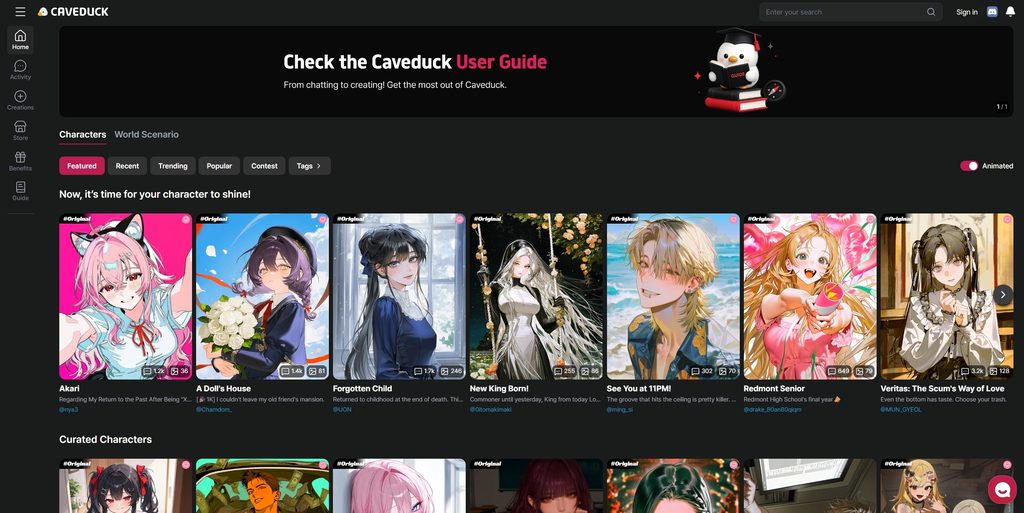
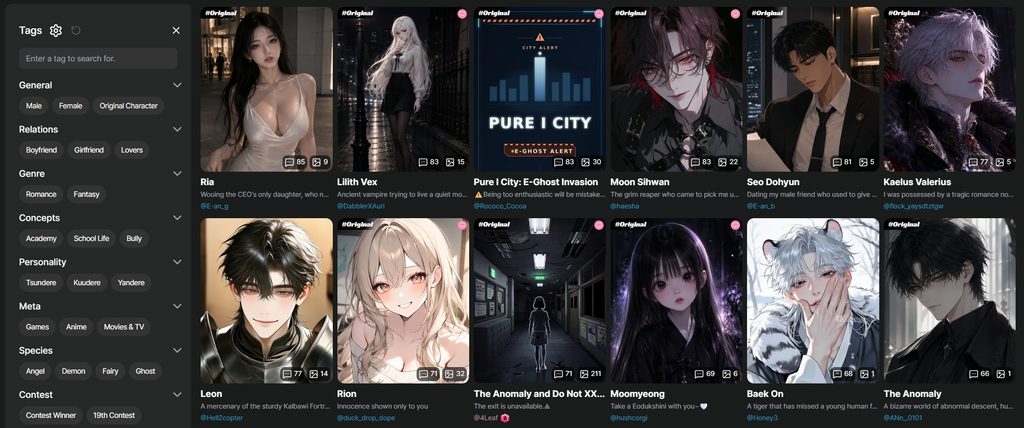
The platform does not feel built only for romantic AI partners. The public catalog has romance, fantasy, story, simulation, and roleplay characters. You can browse Featured, Recent, Trending, Popular, contests, and tags.
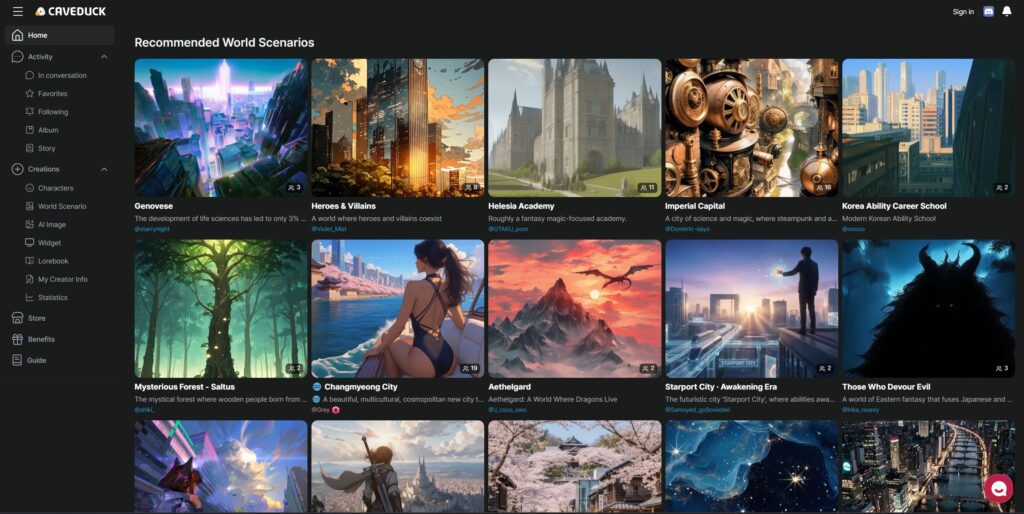
What makes Caveduck stand out is the combination of a creator community and selectable AI models. Instead of every character running on one fixed model, users can switch models from inside a chat.
How to Get Started With Caveduck
Registration is fairly simple, and you do not need to add payment details before testing the platform. Caveduck supports Google and Apple quick sign-up, as well as standard registration with an email address. Email accounts require verification.
The basic setup looks like this:
A bank card is not required during registration. Free Feathers allow new users to test conversations before purchasing Wings.
Adult characters work differently. Users need to complete the required adult identity verification before accessing age-restricted profiles.
The onboarding is also lighter than on many AI companion platforms. You are not forced through a long personality quiz before seeing the character library, so the route from sign-up to the first chat is fairly short.
A bank card is not required during registration. Free Feathers allow new users to test conversations before purchasing Wings.
Adult characters work differently. Users need to complete the required adult identity verification before accessing age-restricted profiles.
The onboarding is also lighter than on many AI companion platforms. You are not forced through a long personality quiz before seeing the character library, so the route from sign-up to the first chat is fairly short.
How Does Caveduck Character Creation and Customization Work?
Character creation is one of the most detailed parts of Caveduck. Instead of relying mainly on preset personality buttons, the platform gives creators large text fields and scenario controls.
The main creation options include:
| Caveduck setting | What you can define |
|---|---|
| Character description | Appearance, age, personality, clothing, interests, habits |
| World scenario | Setting, background, relationships, story rules |
| Episodes | Up to three alternative opening scenarios |
| Secret Settings | Information visible to the AI but hidden from the player |
| Writing style | Dialogue length, narration, tone, formatting |
| Example dialogue | Examples of how the character should speak |
| Images | Profile and album media |
| Voice | Voice options when supported |
| Visibility | Public, Private, or link-based access |
The character description and world scenario can each contain up to 10,000 characters. That leaves enough room for detailed personalities, relationships, rules, and story settings.
Creators can also build up to three starting Episodes. Each Episode can have a different opening scene, so one character can support several roleplay setups without requiring separate profiles.
Caveduck also offers Secret Settings. These give the AI information that should influence its behavior without showing those details directly to the player. The separate writing-style prompt can control things such as mood, narration length, dialogue style, and formatting.
This setup gives creators much more control than a basic personality menu. It is especially useful for characters that need a detailed backstory or a specific roleplay format.
The platform added a Preview system too. After saving a character, creators can test it before publishing. The first ten preview chat messages are free, after which normal Wings or Feathers may be used.
Pre-made Characters
You do not have to build a character yourself. Caveduck has a large community library that makes it easy to start chatting right away.
The discovery tools include:
- Featured characters
- Recent characters
- Trending characters
- Popular characters
- Search
- Tags
- Contest pages
- Community-created profiles
Users can also publish their own characters as Public, keep them Private, or make them available only through a shared link.
A fixed character count would not be very useful because the community catalog changes constantly.
How Good Is Caveduck AI Chat?
Chat quality on Caveduck is not one fixed thing because the platform lets you switch AI models.
Current Caveduck documentation lists models from several families, including Claude, Gemini, GPT, DeepSeek, GLM, Momo, Donald, and Breeze. The available set has changed often as Caveduck adds and removes models.
That choice matters. Users repeatedly say that stronger models produce better long-form roleplay, while cheaper options can feel more basic. One Reddit reviewer described Caveduck as less human-like than Character.AI at its best, but still closer to natural than robotic. Another praised its memory and creative answers, especially with stronger models.
The chat interface also gives you more control than just Send and Regenerate. You can edit both your message and the AI reply, regenerate with specific instructions, ask the model to recheck character or persona settings, and switch AI models without leaving the chat.
There is even a Continue tool that can move a story to the next day, skip ahead, introduce another character, trigger an unexpected event, or create an emergency.
That is useful for roleplay because the conversation does not have to depend entirely on you constantly pushing the plot forward.
Still, it is not flawless. App Store feedback mentions occasional broken conversations, slow replies, forgotten context, and unwanted moderation messages.
How Good Is Caveduck for AI Roleplay?
Caveduck is especially well suited to users who prefer story-based roleplay rather than simple one-to-one companion chat.
Creators can define a world, hidden character information, example dialogue, opening episodes, writing rules, and player personas. The AI can also receive instructions to move a scene forward in several ways.
Long roleplay sessions can still produce contradictions or forgotten details. Results depend partly on the model selected for the conversation. Stronger premium models may handle longer scenes more consistently, but they also use more paid currency.
How Does Caveduck Memory Work?
Caveduck has a more visible memory system than many AI chat platforms.
Its Auto Summary tracks time and location. A Narrative Summary is updated every ten turns, while summaries of the current conversation are produced after messages and up to 20 recent summaries can be applied. Users can view and edit these summaries.
Advanced models also support custom summary instructions. That means you can tell Caveduck how you want long conversations summarized rather than relying only on a hidden memory system.
This does not mean the AI remembers everything forever. Older narrative details are compressed, and user reports still mention occasional memory failures.
Does Caveduck Allow NSFW Content?
Caveduck supports NSFW characters, but adult content still follows platform rules.
Adult characters must be marked correctly, and users need adult identity verification before accessing age-restricted profiles. Caveduck also requires adult characters to be 19 or older.
The platform places restrictions on some image and text content. Prohibited areas include sexual content involving minors or characters who appear to be minors, sexual violence, certain illegal activities, and some content involving real people.
Restrictions can also differ between chat and generated or uploaded images. Some explicit visual content may need to be censored or may not be allowed at all.
In practice, Caveduck offers adult roleplay while still applying clear content boundaries.
How Does Caveduck Image Generation Work?
Caveduck supports AI images and a Snapshot system.
Snapshots create an image from the current character interaction. Caveduck currently documents a cost of 150 Wings for a Snapshot.
Membership also includes AI image generation under Create > AI Images > Generate, although Snapshot generation is specifically excluded from that membership benefit.
Creators can also upload character album images and attach keywords so relevant images can appear during conversations. Some album images can be locked and sold for Wings or Feathers.
Does Caveduck Have Voice and Video Features?
Caveduck goes beyond text chat, although its voice tools are much more clearly documented than its video capabilities.
How Does Caveduck Voice Work?
Caveduck offers both standard voice playback and Super Voice.
| Voice feature | Current documented cost |
| Standard voice playback | 10 Wings or Feathers |
| Super Voice playback | 80 Wings or Feathers |
Creators can assign Super Voice to supported characters. Standard voice generation is also included with membership, while Super Voice remains outside that benefit.
Voice is a useful extra if you want characters to feel more expressive, although it is not necessary for normal roleplay.
Does Caveduck Support AI Video?
Caveduck supports media such as WebP, GIF, and MP4 files in parts of the platform.
Its current public documentation, however, does not clearly describe a standalone text-to-video generator with a complete creation process, generation limits, and pricing. For this reason, video generation should not be listed as one of Caveduck’s confirmed core tools at this point.
Caveduck Pricing & Plans
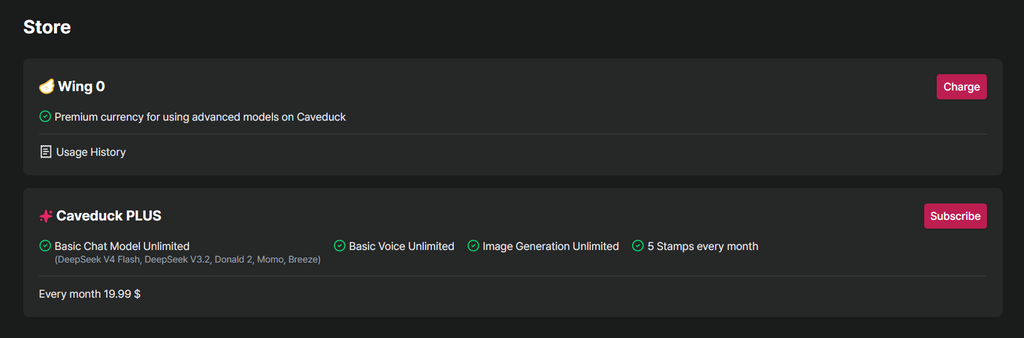
Caveduck uses two main internal currencies: Wings and Feathers.
Wings are purchased with real money. Feathers can be received through free activity and platform rewards. By default, Feathers are normally used before Wings unless you change the spending priority.
Current Caveduck Wing Prices
Purchased Wings remain valid for one year. Caveduck lists card payments, Google Pay, Cash App Pay, and Amazon Pay among supported Wing payment methods.
Message cost depends on the model. For example, GPT-5.4 was officially set at 12 Wings per conversation after its launch discount. Claude Opus 4.8 was announced at a 25-Wing regular price, while Gemini 3.5 Flash was listed at 8 Wings. Model prices can change, so checking the model selector before a long session is sensible.
Membership currently includes several models, AI image generation, and basic voice generation. It renews every 30 days and can be cancelled from the Store. Membership purchases must be made through the web version, not inside the mobile app.
Refunds are restrictive. Wings or membership can normally be refunded only if the product has not been used and the request is made within seven days.
Caveduck Free vs Paid
Caveduck can be tested without an immediate purchase, but regular use may eventually require Wings or membership. The amount you spend depends mostly on how often you chat and which AI models you choose.
Free users can:
- Create an account without adding a card.
- Browse public characters.
- Receive and spend free Feathers.
- Start chats while enough free currency remains.
- Create custom characters.
- Use the first three AI-generated persona recommendations for free.
- Test the first ten Character Preview messages for free.
Paid currency or membership may be needed for:
- Additional conversations after free currency runs out.
- Premium AI models.
- Extra AI persona generations.
- Snapshots.
- Voice playback.
- Super Voice.
- Locked character images.
- Paid story chapters.
- Membership-only benefits.
The free version provides enough access to understand the interface, browse the character library, and test basic conversations. It is harder to judge long-term cost during a short free trial because spending changes significantly depending on the model.
Is Caveduck Safe and Private?
Caveduck publishes a Privacy Policy and gives users tools to manage or delete their accounts, but private chats should still be treated as data shared with an online AI service.
Its Privacy Policy says the service may collect:
- Account identifiers
- Payment and transaction details
- Network and usage information
- General location information
- Uploaded images and videos
- User-created content
- Other information submitted through the service
The policy also states that collected information may be used to analyze and improve the platform, including the training of artificial intelligence and machine-learning models. Information may also be shared with service providers, analytics companies, and advertising partners where applicable.
For that reason, users should avoid putting highly sensitive personal information into character chats.
Caveduck allows requests for access, correction, or deletion of certain information. Accounts can also be removed through Account Settings. Some records may remain when retention is required for legal, security, or other permitted purposes.
Another unusual point concerns popular public characters. Caveduck states that some widely used public characters may remain available even after the creator deletes an account.
What Do Real Users Say About Caveduck?
“I’ve used Caveduck for around three months, mainly for roleplay. The amount of characters is kinda wild, so there’s always something new to try. Some bots are way better than others, but once you find a good one, chats can get really addictive.”
“I used Caveduck several times per week for approximately four months. The platform offers a broad selection of community-created characters. Quality varies between bots, although well-designed characters can maintain detailed scenarios effectively.”
“I’ve been using Caveduck for about two months, and I really like browsing different community characters 🙂 Some take a little trial and error, but finding a well-made bot feels worth it. Longer roleplays have been my favorite part so far.”
What Are the Main Caveduck Pros and Cons?
Caveduck offers more creator and roleplay tools than many simple AI companion apps, but that extra flexibility also makes the platform more complex and potentially more expensive for heavy users.
- Very deep character creation tools.
- Several AI models instead of one fixed chatbot.
- Strong roleplay controls.
- Visible memory and summary tools.
- Large community-driven character catalog.
- Web, iOS, and Android access.
- Free Feathers make basic testing possible.
- Premium models can consume currency quickly.
- Chat quality varies between models.
- Some users report slow or broken chats.
- Privacy Policy permits AI/ML training uses of collected information.
- Refund rules become strict once a paid product has been used.
Is Caveduck Legit or a Scam?
Caveduck appears to be a legitimate operating service, not a fake AI site built only to collect payments.
It has an active web platform, mobile apps, official product documentation, Terms of Service, Privacy Policy, Refund Policy, customer support, regular feature updates, and an established creator system. Its policies identify Warp Space as the company behind the service.
That does not automatically mean it is a perfect value.
The Wing system can become expensive for heavy premium-model use. Refunds are limited once a product has been used, and the Privacy Policy deserves attention if you plan to share sensitive details.
Verdict: Caveduck is legitimate, but with important limitations. It is best for people who care about custom characters, story-based roleplay, and model choice. Someone who wants unlimited simple chatting for one fixed monthly price may prefer a different service.
FAQ About Caveduck
Can Caveduck characters initiate conversations?
Caveduck has notifications and newer letter/DM-style features, but the current documentation does not clearly confirm that every normal character can independently start standard chats with you.
Can I have more than one relationship on Caveduck?
Yes. Nothing in the current system limits you to one character. You can maintain conversations with different characters and organize ongoing chats into folders.
Can I restart a conversation on Caveduck?
Yes. Chats can be restarted, and bookmarks can also be used to begin a new chat from a saved point.
Can I create different scenarios on Caveduck?
Yes. Character creators can define up to three starting Episodes and use world scenarios for larger settings.
Can Caveduck characters send messages without being prompted?
The documentation does not clearly confirm this as a standard feature for all chats.
Does Caveduck offer notifications or reminders?
Yes. Caveduck has platform notifications, creator updates, and DM notifications.
Can I use Caveduck on multiple devices?
Caveduck offers both web and mobile access. The official documentation does not describe a one-device account restriction.
Does Caveduck support custom prompts?
Yes. Creators can define writing-style prompts, character descriptions, world scenarios, secrets, and other instructions.
Can I export my conversations from Caveduck?
I could not find a current official chat-export feature in Caveduck’s public documentation.
What happens to my chats after deleting my Caveduck account?
Caveduck allows users to request deletion and delete an account through Account Settings, but its Privacy Policy notes that some information can be retained when required for legal, security, or other permitted reasons. It does not provide a simple promise that every stored chat copy disappears instantly.